Party Invitations: A Tap-to-Open Invite With RSVP
A birthday message says "I'm thinking of you." A Party Invitation asks something different: "can you come?" WishCopy's invitations turn a group text full of "what time again?" replies into one private link — with the date, time, and location built in, and every RSVP collected in one place instead of scattered across a chat thread.
How it works
- Set the details. Event date and time (required), location, how many people you're inviting, an optional dress code or what-to-bring note, and a personal message to guests.
- Pick a theme, if you want — tap the one-tap Kids Party or Formal preset for a matching accent color, headline font, and backdrop together, or set a backdrop individually from dozens of AI-generated photo and illustrated themes (or your own photo), plus your own color and font.
- Add a photo or two, if you want — up to three, or design a sticker invite right in the built-in Sticker Studio.
- Share one private link with your guest list, and pick the Link Preview image it shows when it unfurls in texts, WhatsApp or socials. That's the only link anyone needs — or hand out the QR code from your dashboard for a printed invite.
- Guests tap to open a reveal envelope, add the event straight to their calendar (Google Calendar or an Apple/Outlook .ics) and get a map link to the venue, then RSVP yes, no, or maybe — with an optional name, note, party size, dietary note, photo, sticker, or a short voice or video message.
- Watch replies land on your live organizer dashboard as they come in — no need to ask around who's seen it yet. Tell it how many people you invited and it keeps a running count of how many have replied.
What guests see vs. what you see
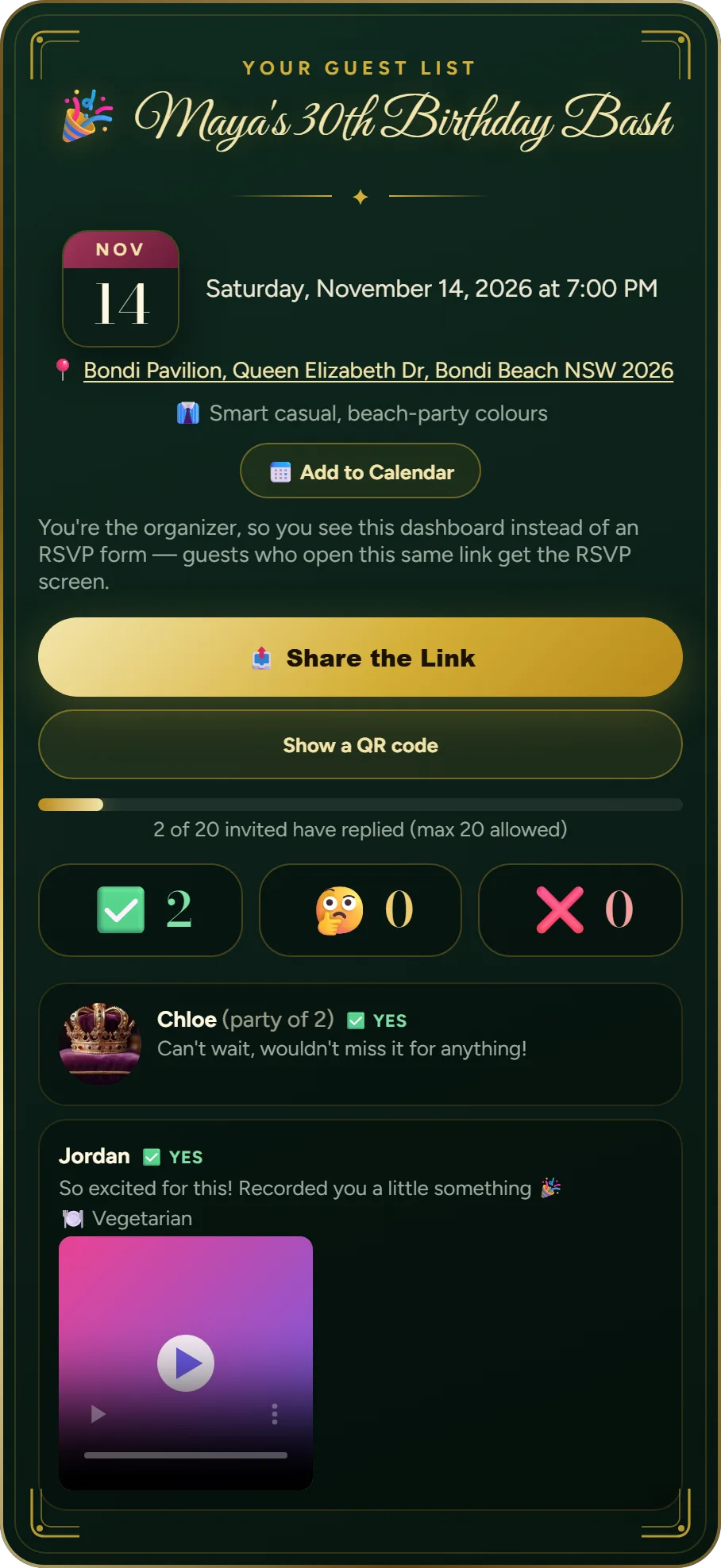
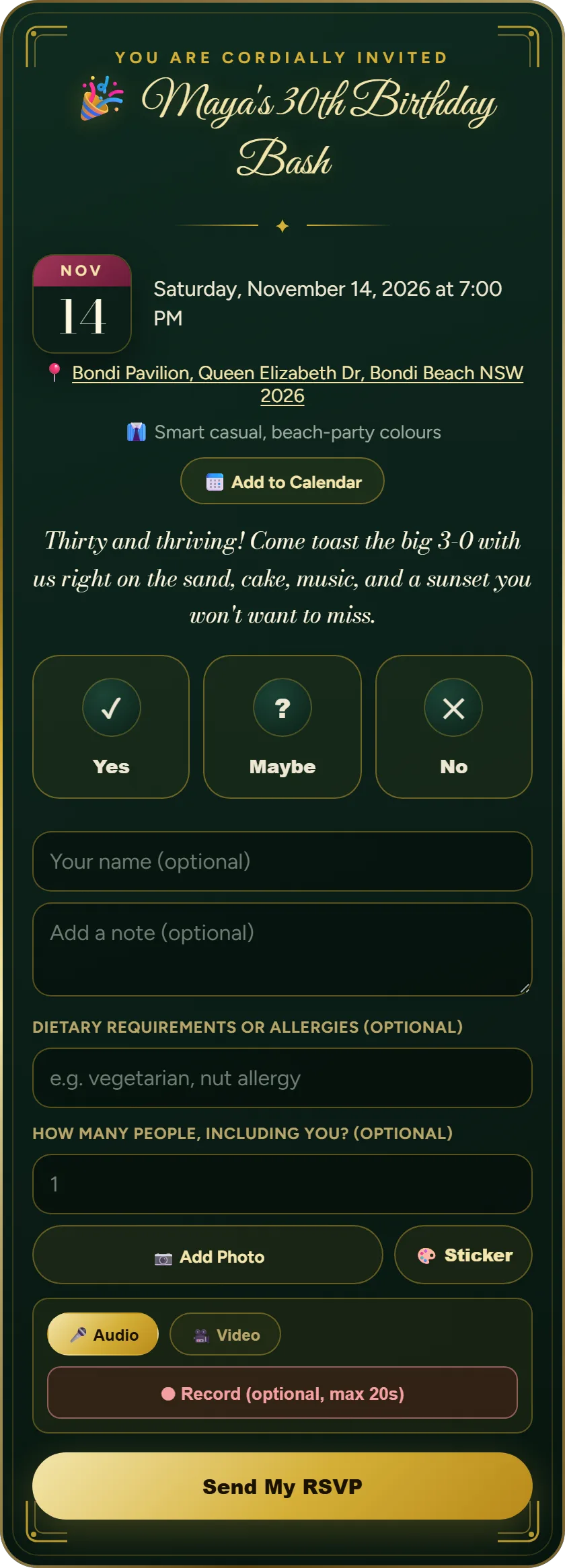
Guests get a simple, focused reply flow: open the envelope, see the event details, RSVP, and optionally leave something personal for you. They only ever see the overall RSVP count and their own reply — not a public wall of everyone else's responses. You, as the organizer, see every individual reply on your own dashboard: who's coming, who can't make it, and any notes, photos, or messages they attached.
🗓️ What you see
💌 What guests see
Why this beats a group chat
A group chat invite gets buried under unrelated replies within a day, and "who's actually coming" ends up requiring a manual scroll-and-count. A Party Invitation keeps the RSVP itself structured and countable, while still leaving room for a guest to add something personal — a photo, a note, a quick voice message — instead of just a thumbs-up emoji.
Not sure what to actually write in the invitation itself? See our guide on how to write a birthday party invitation for the details every invite needs and how to word it for different kinds of parties.
Frequently asked questions
What is a Party Invitation?
A private link with your event's date, time, and location. Guests open a tap-to-reveal envelope and RSVP with yes, no, or maybe, plus an optional name, note, and photo, sticker, voice, or video message.
How do guests RSVP?
They open your link, tap the envelope, and reply with yes, no, or maybe, along with an optional name, note, photo, sticker they design on the spot, and a short voice or video message.
Can I see who has responded?
Yes. You see every reply on a live organizer dashboard as they come in. Guests, by contrast, only ever see the overall RSVP count and their own reply — not everyone else's.
How long does the invitation stay open?
Until 14 days after the event date, so guests can still RSVP and you can look back at replies afterward. After that, the link and any attached photos, voice, or video are automatically and permanently deleted.
Do guests need to sign up or install anything?
No. Guests just open the link and reply. No account, app, or sign-up is required for you or for them.
Can I choose a backdrop for the invitation?
Yes — when creating your invitation, you can optionally pick from dozens of AI-generated backdrops — elegant photo themes like Garden Party and Elegant Estate, or illustrated ones like Dino Jungle and Candy Carnival — or upload your own photo, instead of the default green theme.
Is there a quick way to theme the invitation?
Yes — tap the one-tap Kids Party or Formal preset to instantly set a matching accent color, headline font, and backdrop together, then fine-tune any of those individually afterward if you want.
Can guests add the event to their calendar?
Yes — from the invitation itself, guests can add the event straight to Google Calendar or download an .ics file for Apple/Outlook, plus get a one-tap Google Maps link to the venue.
Can I set a dress code or ask about dietary needs?
Yes — you can add an optional dress code or what-to-bring note when creating the invitation, and guests can add a dietary note and how many people they're bringing (up to 20) when they RSVP.
Send a Party Invitation →